01
Snap your plate
Open the app and photograph whatever you’re eating — home-cooked, takeout, half a cookie. That’s the entire input.
§ 00 · AI Calorie Camera
On the App Store · iOS
Snap your meal and a puzzle piece falls into place. No red numbers, no streak shaming, no “you blew it.” The AI gives you an honest range you can fix in a tap — so one messy day never erases what you’ve logged. Made for everyone who has quit a tracker before.
Free to start · 10 free AI scans · On the App Store
§ 01 · How it works
Open the app and photograph whatever you’re eating — home-cooked, takeout, half a cookie. That’s the entire input.
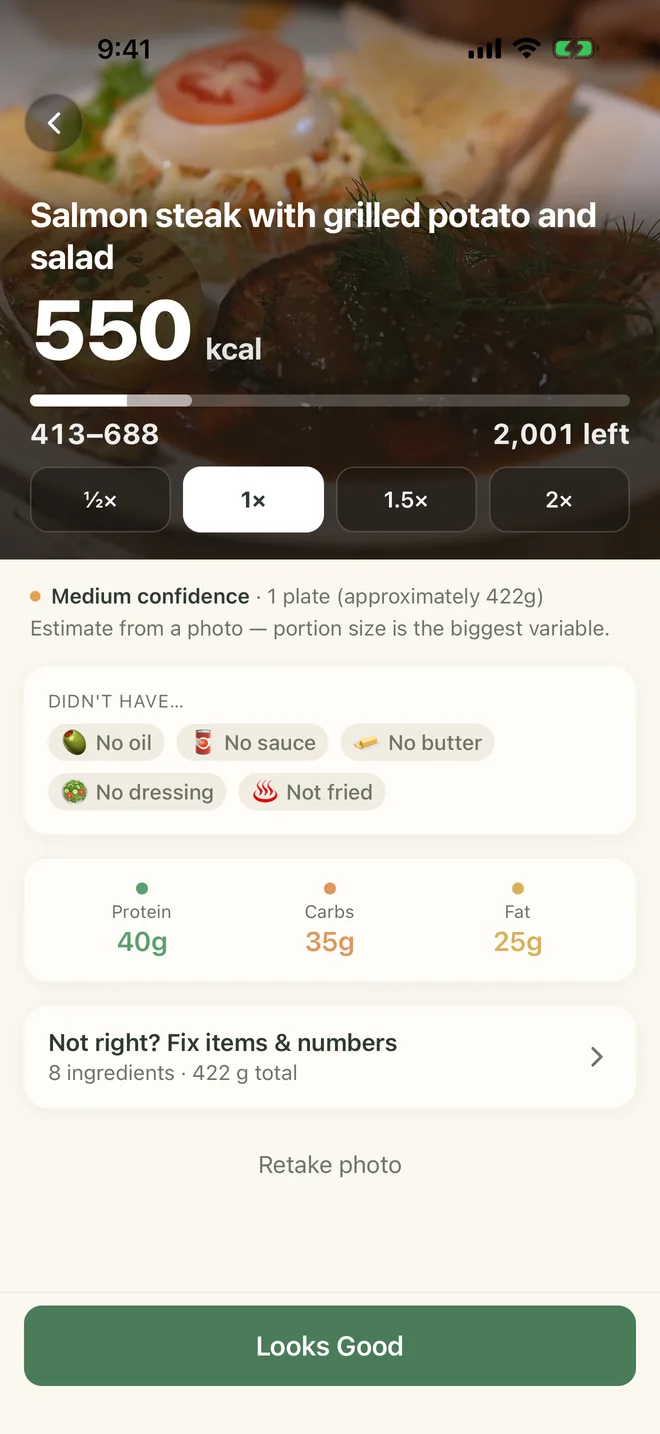
The AI reads the food and shows an honest range. If it missed the oil or the portion looks off, fix it in one tap. Or just accept it and move on.
The meal joins today’s log and places a piece in today’s puzzle, and your macros update as you go. Every meal you log is kept.
§ 02 · What you get
Each day is a puzzle: every meal you log places a piece, and by dinner you can see how the day came together. The app also counts your days in a row. Miss one and the count is frozen, not wiped — log today to keep it. Miss more and it steps aside without showing a zero.
Go over and nothing turns angry. No alarms, no “you blew it,” no shame. A heavy day is just one piece of a much bigger picture.
Real food is messy, so the AI shows a confidence range, not a fake-exact number. One tap adds the hidden oil, butter, or sauce; a slider fixes the portion. You are never stuck with a guess that feels wrong.
Point your camera at the plate and the AI fills in calories, protein, carbs and fat. Packaged food? Scan the barcode — barcode scanning is free, always. Or type what you ate, or use your keyboard’s dictation key, and get an estimate the same way a photo does. No weighing every gram.
Calm weekly patterns show you what your eating actually looks like — gentle awareness, not a number to fear. It is here to help you keep going, not to police you.
Photos are sent to the AI only to read the food, and we don’t keep them. Your log is saved to your account. We never sell it, mine it, or hand it to advertisers.
Connect Apple Health to see today’s workouts and active energy, and to sync your weight, one entry per day. The app only reads from Apple Health; it never writes to it. On Apple Watch (watchOS 11 or later), see how many calories you have left today and log one of your three most recent foods again.
Tap Ask on the Dashboard and ask one question about your last 7 days. Answers use only your log and your targets. Before your first question, the app shows exactly what is sent to Google’s AI — never your weight, body profile or Apple Health data. Answers are AI-generated, can be wrong, and are not medical advice.
Pick a 12:12, 14:10, 16:8 or 18:6 window from the Dashboard and see how long is left. The alert at the end is off unless you turn it on. Fasting is only available for people 18 and older.
In Profile, tap Export my data to save your meals and your weight as two CSV files, each with your full history.
§ 03 · Pricing
No hidden seats, no “contact us”, no surprise renewals. The cancel button is exactly where you expect it.
Free
Start with 10 free AI scans. Manual logging stays free, always.
Pro
Also $7.99 a month or $3.99 a week. Only the annual plan has the free trial; it renews at $34.99 a year unless you cancel at least 24 hours before the trial ends. Prices are US App Store prices; in your country you’ll see the local price.
App Store / Play Store manage subscriptions · No data sold, ever
§ 04 · Common questions
Can't find what you need? Email support@stellandra.com and a human writes back.
§ 05 · Get the app
Free to download. No card. No tracking pixel. Just open it and start.
Free, no sign-up
While AI Calorie Camera finishes baking, explore the free calorie references and calculators. No account, no paywall.
Food calorie lookup→
Calories and macros for hundreds of everyday foods, USDA-aligned.
Restaurant calories→
Menu nutrition for 30+ chains — McDonald’s, Starbucks, Chipotle and more.
Free calculators→
BMR, TDEE, macros, calorie deficit and more — instant, no sign-up.
App comparisons→
How AI Calorie Camera compares to MyFitnessPal, Cronometer and others.
Was this worth your time?